Link Unfurling
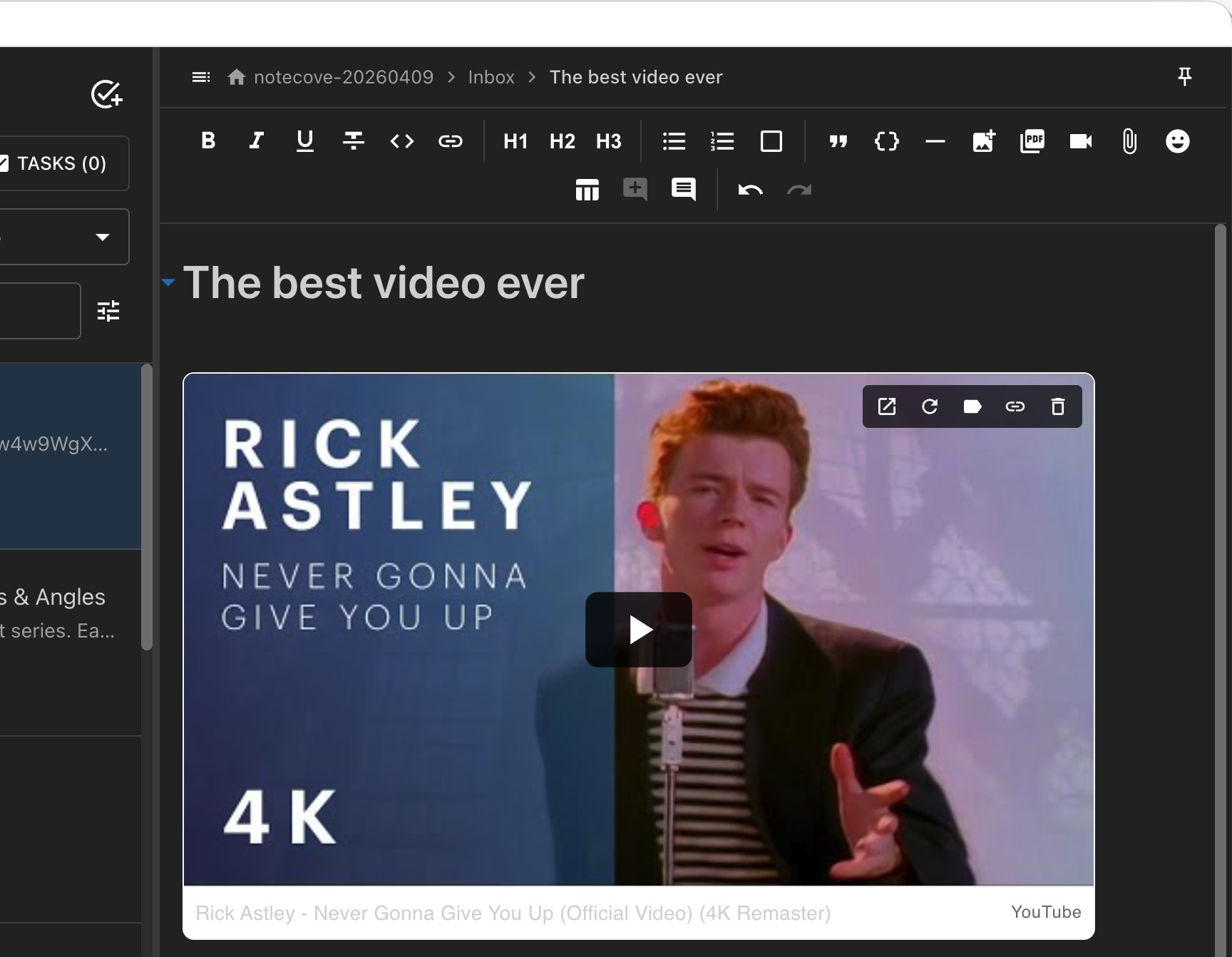
NoteCove automatically creates rich previews for links you paste into your notes using the oEmbed protocol.
::: info Platform Availability Link unfurling is available on both Desktop and iOS. On iOS, you can also choose between different link display modes (chips, previews, or plain links) in Settings. :::
How It Works
When you paste a URL from a supported site, NoteCove:
- Detects the URL - Recognizes links from 300+ content providers
- Fetches metadata - Retrieves title, description, thumbnail, and author info
- Creates a preview card - Displays a rich, interactive preview inline
Supported Providers
NoteCove supports 300+ content providers including:
Video Platforms
- YouTube
- Vimeo
- TikTok
- Twitch
- Dailymotion
Social Media
- Twitter/X (posts and profiles)
Development
- GitHub (repos, gists, issues)
- CodePen
- JSFiddle
- Replit
- StackBlitz
Productivity
- Figma
- Notion (public pages)
- Miro
- Loom
- Calendly
Media
- Spotify (tracks, albums, playlists)
- SoundCloud
- Giphy
- Flickr
- Imgur
Documents
- Google Docs/Sheets/Slides (public)
- SlideShare
- Scribd
- Speaker Deck
Preview Card Features
Each unfurled link displays:
- Thumbnail - Visual preview of the content
- Title - Page or content title
- Description - Brief summary when available
- Author - Creator name and avatar
- Provider - Source website with favicon
Interactive Actions
Hover over a preview card to reveal:
- Open link - Opens the URL in your browser
- Copy URL - Copies the link with rich HTML formatting
- Refresh - Re-fetches the preview metadata
Link Display Modes (iOS)
On iOS, you can control how links appear in your notes by choosing a default display mode in Settings > Links:
Unfurl (Default)
- Single links in paragraphs show as rich preview cards
- Multiple links in the same paragraph show as compact chips
- Context-aware: automatically adapts based on surrounding content
Chip
- All links display as compact chips with favicon and title
- Consistent, space-efficient appearance
- Good for notes with many links
Plain Link
- Links appear as plain text without decoration
- Minimal visual distraction
- No network requests for metadata
Converting Individual Links
Long-press any link or chip to show a conversion menu with options to:
- Show as Chip
- Show as Preview (only for single links in paragraphs)
- Show as Plain Link
This lets you override the default mode for specific links.
Settings
Access link unfurling settings from Settings > oEmbed (Desktop) or Settings > Links (iOS):
Enable Discovery
When a URL isn’t recognized by a known provider, NoteCove can attempt to discover oEmbed endpoints directly from the page. This works with many sites that support oEmbed but aren’t in the main registry.
Toggle this setting to control discovery behavior:
- Enabled (default): Attempts discovery for unknown URLs
- Disabled: Only unfurls URLs from known providers
Cache Management
Preview data is cached locally to improve performance:
- Refresh All - Re-fetches all cached previews
- Clear Cache - Removes all cached preview data
The cache shows size statistics so you can monitor storage usage.
Registry Updates
NoteCove periodically checks for updates to the oEmbed provider registry to support new services. The settings panel shows:
- Last registry check date
- Number of known providers
- Option to manually check for updates
Keyboard Shortcuts (Desktop)
| Action | Shortcut |
|---|---|
| Insert link | Cmd+K / Ctrl+K |
| Paste URL | Cmd+V / Ctrl+V |
Touch Gestures (iOS)
| Action | Gesture |
|---|---|
| Open link | Tap chip or link |
| Convert link | Long-press chip or link (500ms) |
| Insert link | Type or paste URL |
Fallback Behavior
When a URL can’t be unfurled:
- Known provider, fetch failed - Shows error state with retry option
- Unknown provider, discovery disabled - Shows as regular link
- Offline - Shows cached preview if available, or offline indicator
Privacy Considerations
- Preview fetching happens through your device, not a central server
- Cached data is stored locally in your application data
- No tracking or analytics on which links you unfurl
- Discovery requests go directly to the target website
- iOS Paranoid Mode: Enable in Settings > Privacy to completely disable all network features including link previews
Performance
Link unfurling is optimized for performance:
- Parallel fetching - Multiple links unfurl simultaneously
- Smart caching - Previews cached for 24 hours by default
- Lazy loading - Thumbnails load on scroll
- Retry logic - Automatic retry with exponential backoff on failure
Troubleshooting
Preview not showing?
- Check that the URL is from a supported provider
- Ensure you’re online (previews require network access)
- Try clicking the refresh icon on the preview card
- Check Settings > oEmbed > Enable Discovery is on
Preview looks outdated?
Click the refresh icon on the preview card to fetch updated metadata.
Too many previews slowing down notes?
Preview cards are lightweight, but for notes with many links you can:
- Use the Cache Management settings to control storage
- Convert unfurled links back to regular links by deleting and re-pasting